

In 2026, cloud intrusions are still dominated by identity compromise, exposed secrets, and misconfigurations, now accelerated by automation and AI-assisted social engineering. The fastest way to reduce risk on Google Cloud is to control the credential lifecycle end to end. Then you reinforce those controls with org-wide guardrails, data exfiltration defenses (VPC Service Controls), and cloud-native detection and response (Security Command Center and Event Threat Detection).
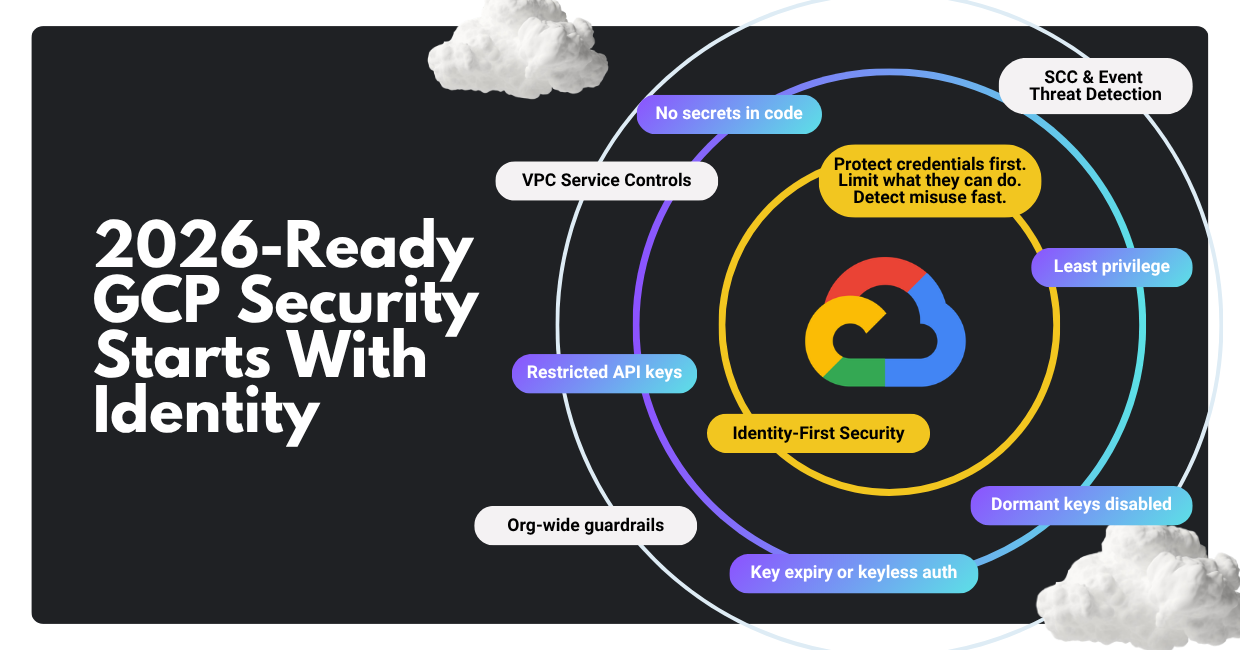
If you do only one thing: make credentials harder to steal, less powerful when stolen, and faster to detect when abused.
In 2026, the Cloud Threat Landscape is Identity-Led
If you’re looking for “the one new trick” in cloud security for 2026, go for a posture shift: assume identity will be abused, and engineer controls that reduce credential exposure, privilege, and blast radius.
Multiple industry and vendor intelligence streams keep landing on the same reality:
- According to Verizon, stolen credentials and exposed secrets continue to power a large share of real-world breaches (especially in web app/API scenarios).
- Google’s threat intelligence reporting continues to emphasize cloud risks tied to identity compromise, data exfiltration paths, and supply chain exposure.
- The 2026 cybersecurity forecasts highlight how adversaries are operationalizing AI and scaling cybercrime and extortion tactics, making “basic hygiene” even more valuable because attackers iterate faster.
This article is written from our day-to-day perspective as Google Cloud security practitioners: what we recommend when we’re asked to harden a GCP environment quickly, without breaking delivery velocity. The throughline is simple: secure the credential lifecycle first, then add the guardrails and detections that keep small mistakes from becoming large incidents.
To set that up properly, let’s start with what “secure-by-default” on Google Cloud really means today.
Your GCP Security Foundation in 2026
Google Cloud gives you powerful security building blocks: identity controls (IAM), organization policies, audit logs, and managed services. The part that decides your real-world outcome is consistency: whether those controls are applied the same way across every project, team, and pipeline, every day.
- Without guardrails, every new project is a fresh chance to accidentally create risky settings, like unrestricted keys, overly broad access, or exposed services. Security becomes dependent on people remembering the right steps under time pressure.
- With guardrails, your cloud environment behaves more like a well-designed building: doors lock by default, access is granted intentionally, and alarms trigger when something unusual happens. Teams can still move fast, but they do not have to reinvent safety each time.
Two practical security realities matter in 2026:
- Some org-level baseline constraints may already be enforced by default depending on your organization’s setup and creation timeline, which can change how certain risky defaults behave. Treat this as a helpful starting point, but not as a complete security strategy.
- Google’s IAM guidance is increasingly explicit: reduce reliance on long-lived service account keys and prefer short-lived or keyless approaches whenever possible.
This means you have to treat your GCP org like a product you operate: define the foundation (resource hierarchy, policies, logging, detection), then enforce it continuously so attackers cannot “shop around” for the one project where controls were forgotten.
Next, we move from foundation to execution: the specific, high-ROI tips we use to reduce cloud compromise risk quickly.
The 2026 GCP Security Playbook: High-ROI Tips You Can Implement Now
What follows are the controls we consider “non-negotiable” for most modern GCP environments. They are designed to be practical: they reduce risk, scale across teams, and hold up even when delivery velocity is high.
We start where most cloud incidents begin—credentials—and then we expand outward into guardrails, exfiltration defense, detection, and resilience.
Tip #1: Secure the credential lifecycle
Credentials are still the fastest way into cloud environments because they’re portable, easily monetized, and often overprivileged. The goal is not “no credentials exist,” but a tight control from creation to retirement, with minimal human handling.
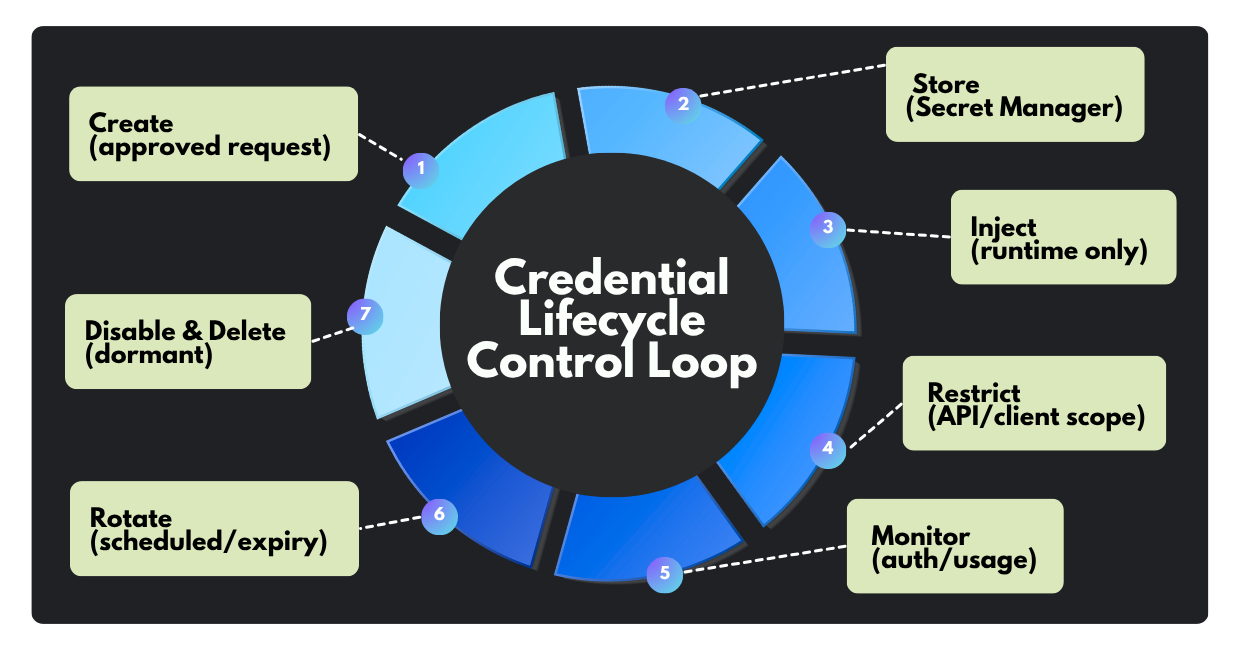
Below are the lifecycle practices we recommend as a non-negotiable baseline.
1. Zero-code storage: never commit keys to source control.
Why it matters: If a key lands in a repo (public or internal), it tends to spread: forks, clones, CI logs, build artifacts, chat copies. That’s “secret sprawl,” and it’s hard to fully reverse.
What to do on GCP:
- Store API keys, tokens, passwords, and certificates in Secret Manager, then inject at runtime rather than embedding in code or config files.
- For common platforms like Cloud Run, use native secret configuration so your service consumes a secret reference (not a plaintext value).
Common failure mode: Teams “temporarily” place secrets in environment variables or build-time configs, then forget to remove them. Use Secret Manager plus CI checks (secret scanning) to prevent regressions.
This sets the stage for the next step: if secrets can’t be prevented entirely, then unused ones must be aggressively removed.
2. Disable dormant keys: audit and decommission anything unused (30–90 days).
Why it matters: Dormant credentials are a gift to attackers: nobody notices misuse, and incident response is slower because owners and dependencies are unclear.
What to do on GCP:
- Use Service account insights and usage metrics to identify service accounts and keys that haven’t been used, and monitor key authentication events.
- Where available, use Policy Intelligence/Activity Analyzer-style views to see recent authentication activity for service accounts and keys.
- Operationally, we like a two-stage process:
- Disable first (to validate no hidden dependencies)
- Delete after a short observation window
Recommended threshold: Your starting guidance of 30 days is a strong operational default for many key types. For broader “account inactivity,” Google also suggests longer windows (for example, service account insights can highlight accounts unused for 90 days).
Common failure mode: Deleting keys without dependency mapping. Use disable-first + monitoring to avoid self-inflicted outages.
Once you’re pruning, the next upgrade is to reduce the damage if a key is stolen.
3. Enforce API restrictions: never leave API keys unrestricted.
Why it matters: An unrestricted API key is effectively “valid anywhere,” which maximizes abuse potential, especially for APIs exposed to the internet.
What to do on GCP:
- Apply API restrictions (limit the key to specific APIs) and client restrictions (lock usage to IPs, HTTP referrers, Android package names, iOS bundle IDs, etc.).
Pattern we recommend:
One key per environment and one key per app surface area, tightly restricted.
Example: “Maps JavaScript API key for production web domain X only.”
Common failure mode: Teams restrict the API list but forget the client restrictions (or vice versa). You want both.
Restrictions help, but they don’t fix overprivilege. That’s next.
4. Apply least privilege to service accounts.
Why it matters: In GCP incidents, privilege creep is a multiplier: once an identity is compromised, broad roles make lateral movement and impact far worse.
What to do on GCP:
- Avoid “owner/editor” style grants for workloads. Prefer purpose-built service accounts with narrow roles.
- Use IAM Recommender/role recommendations to identify and remove unused permissions, especially for service accounts that naturally accumulate access over time.
Common failure mode: Teams treat least privilege as a one-time “pre-production checklist.” In reality, it’s a maintenance loop: new features add permissions, old ones remain.
Now, even well-scoped keys can become a problem if they live forever, so we enforce time bounds.
5. Mandatory rotation and expiry: limit lifespan and reduce long-lived keys
Why it matters: Long-lived keys turn small leaks into long-lived breaches. Time-bounding shrinks the attacker’s window.
What to do on GCP:
- Enforce service account key expiry using the organization policy constraint
constraints/iam.serviceAccountKeyExpiryHours (maximum lifespan in hours for newly created user-managed service account keys).
- If service account keys are not needed, disable their creation using the org policy constraint commonly referenced as iam.disableServiceAccountKeyCreation (a legacy managed constraint) to block new user-managed keys.
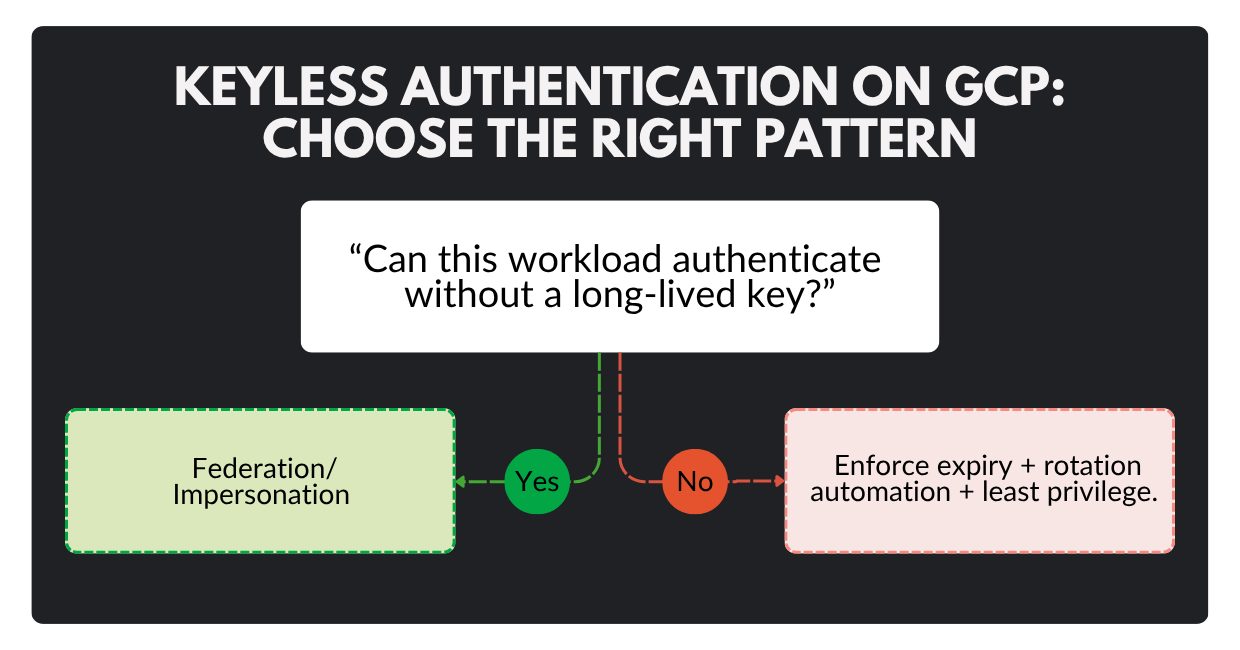
- Prefer keyless/short-lived approaches such as Workload Identity Federation, which allows workloads outside Google Cloud to impersonate service accounts without distributing long-lived private keys.
Common failure mode: Enforcing expiry without an operational rotation playbook (leading to outages). Stage rollout: start with non-prod, validate rotation automation, then enforce org-wide.
Next, we need to extend these controls into org-wide guardrails so every project inherits the baseline, even when teams move fast.
Tip #2: Put org-wide guardrails in place
The difference between “secure workloads” and a “secure cloud program” is consistency. Guardrails ensure new projects don’t start from scratch, or worse, start from unsafe defaults.
What to implement first:
- Adopt a security foundation approach (resource hierarchy, policy structure, centralized logging, and shared services). Google’s security foundations blueprint is a strong reference model for this kind of landing zone thinking.
- Use organization policies to enforce non-negotiables (credential constraints, external exposure controls, key settings, etc.). Baseline constraints may already be enforced depending on org creation date, yet you should treat that as a starting point, not the finish line.
Operational closure: Guardrails work best when they are measurable. Tie policies to continuous reporting (SCC posture findings, config drift checks in CI) so “exceptions” don’t become permanent.
With guardrails in place, you can safely move to the next risk amplifier in 2026: exfiltration paths, especially from high-value data services.
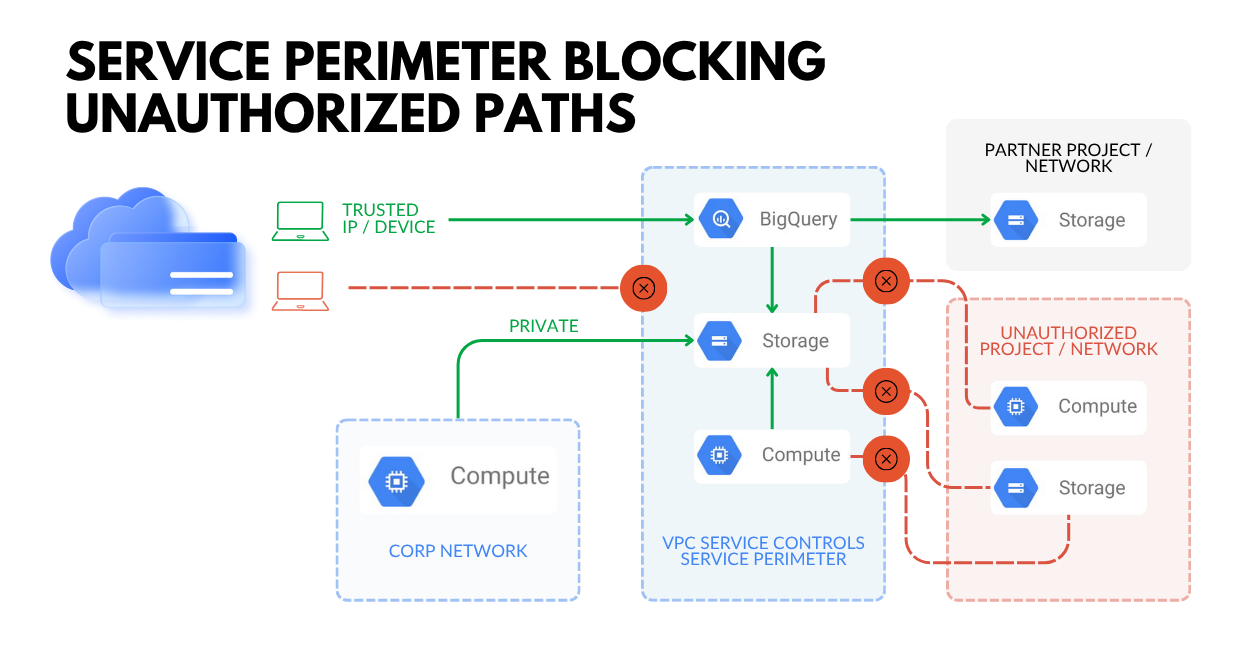
Tip #3: Reduce data exfiltration risk with service perimeters and context-aware controls
Even with perfect IAM, data can still leak through unintended paths: compromised credentials, OAuth/token abuse, misrouted network egress, or simple operator mistakes.
What to do on GCP:
- Use VPC Service Controls to establish virtual security perimeters around supported Google-managed services (e.g., Cloud Storage, BigQuery) to help mitigate exfiltration risk from external or insider threats.
- Treat VPC Service Controls as a complement to IAM: IAM answers “who can access”; service perimeters help answer “from where, and along which paths can data move.”
Operational closure: VPC Service Controls can be complex in real environments (partners, pipelines, multi-project setups). Phase it: start in dry run, tune, then enforce, especially for your high-value datasets.
Once exfiltration is harder, attackers often pivot to persistence or to exploiting weak visibility. That’s why detection maturity is crucial.
Tip #4: Make detection and response “cloud-native” with SCC & high-signal telemetry
Even with phishing-resistant MFA in place, attackers still find ways to win time: they trick users through social engineering, steal session tokens, abuse OAuth grants, or quietly reuse credentials that were never decommissioned.
Your advantage here is speed and containment: detect suspicious activity early, and make sure any compromised identity can only reach a limited set of resources.
What to do on GCP:
- Enable and optimize Security Command Center (SCC) and follow Google’s guidance on prioritization (high-value resource sets), detector enablement, and operational usage.
- Use Event Threat Detection for near-real-time detection logic built on Google threat intelligence and anomaly detection approaches.
Operational closure: Detection without ownership becomes noise. Route high-confidence SCC findings into your incident workflow (ticketing/SIEM), define SLAs by severity, and test your playbooks quarterly.
With identity controls, guardrails, exfiltration defenses, and detections in place, the final step is resilience: preventing extortion from becoming an existential event.
Tip #5: Build ransomware/extortion resilience into your cloud architecture
Threat intelligence continues to flag extortion as a major disruptive force, and cloud environments are increasingly part of that playbook, especially when backups, data stores, and identity controls aren’t hardened.
What to do:
- Treat backup/admin identities as Tier-0: strongest auth, smallest group, strongest monitoring.
- Make destructive actions harder: time-bound access, approvals, and break-glass procedures.
- Ensure you can recover cleanly: validate restore paths, not just “backup exists.”
Resilience is not something you “turn on.” It is something you have to practice. The win condition is measurable: you consistently meet your RPO/RTO targets in realistic restore tests, and you can execute recovery without improvising permissions, keys, or access under pressure.
Now let’s convert these tips into a simple checklist you can socialize internally.
The 2026 GCP Security Baseline: A Checklist You Can Enforce
Security programs stall when guidance is long and ambiguous. This checklist is designed to be simple, enforceable, and measurable, so engineering teams know what “good” looks like and security teams can verify it without debate.
Use the table below as a one-page internal baseline: it maps each control area to the minimum standard you can enforce and the native GCP building blocks that support it.
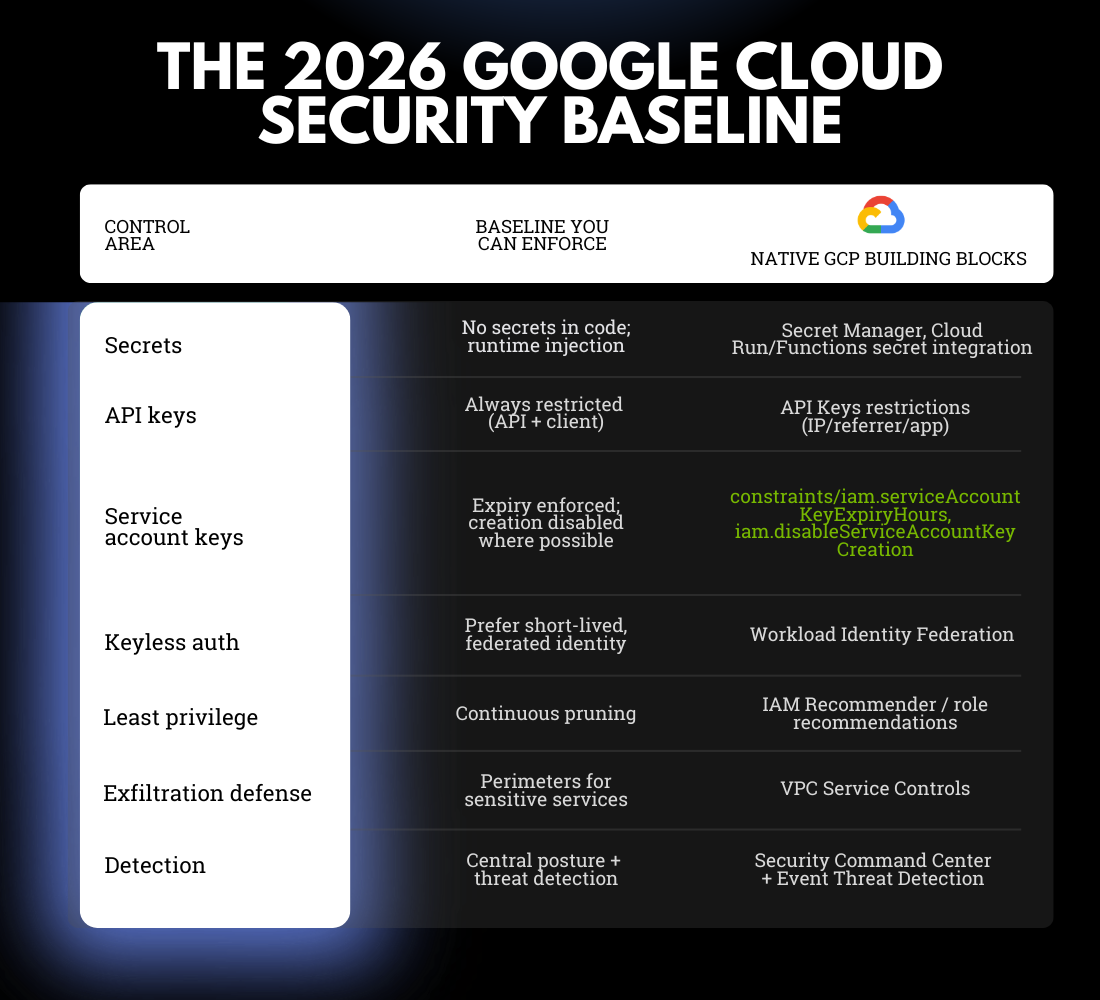
Once this baseline is enforceable, improvements become iterative instead of chaotic: you can raise standards gradually without reopening foundational debates every quarter.
Turn 2026 Threats Into Enforceable Controls
Here is the honest 2026 cloud security reality: attackers are not necessarily “smarter,” but they are faster and have more tools that automate their work. If your response is a series of one-off fixes, you stay reactive. If your response includes credential discipline, guardrails, containment, detection, and resilience, you force attackers into narrower, noisier paths, and you reduce the blast radius when something slips through.
If you want a second set of eyes on your GCP security posture, or a hands-on hardening plan your engineering teams will actually adopt, book a call with our Google Cloud cybersecurity experts. We’ll walk through your current state, identify the highest-ROI control gaps, and propose a prioritized rollout that balances security with delivery velocity.
FAQ
1) What is the fastest way to reduce GCP breach risk in 2026?
Control credentials: remove secrets from code, disable dormant keys, restrict API keys, enforce least privilege, and time-bound or eliminate service account keys where possible.
2) Should we completely ban user-managed service account keys?
In most modern environments, yes, unless a legacy constraint forces them. If you cannot fully ban them, enforce maximum lifetimes, automate rotation, and tightly scope permissions.
3) What is “keyless” authentication, and why does it matter?
Keyless means you avoid distributing long-lived private keys. Instead, you use short-lived, brokered credentials (for example, via federation/impersonation). It dramatically reduces “credential theft that works forever.”
4) How do we enforce least privilege without slowing engineering teams down?
Start with a baseline role per workload, then prune with IAM recommendations after real usage stabilizes. Make least privilege a maintenance loop, not a pre-launch ceremony.
5) What is the biggest mistake teams make with Secret Manager?
They store secrets correctly, but still expose them through build logs, environment dumps, or overly broad access to secret versions. Storage is only step one; access control and runtime hygiene matter.
6) When should we use VPC Service Controls?
When you have high-value data in supported Google-managed services and want an additional layer to reduce exfiltration risk, even if IAM is compromised. Start with dry run and phase into enforcement.
