

AI connectors let enterprise AI securely access business systems like Salesforce, Snowflake, Jira, HubSpot, Confluence, SharePoint, and internal knowledge bases. Without connectors, most “enterprise AI” hits predictable limits: outdated context, missing numbers, and answers that don’t reflect how your business actually runs. Gemini Enterprise integrations support an agentic approach: agents use connectors/tools to pull real-time, permissions-aware context from your systems. Zazmic builds production-ready connectors and agents so Gemini Enterprise can work with your proprietary data securely and at scale.
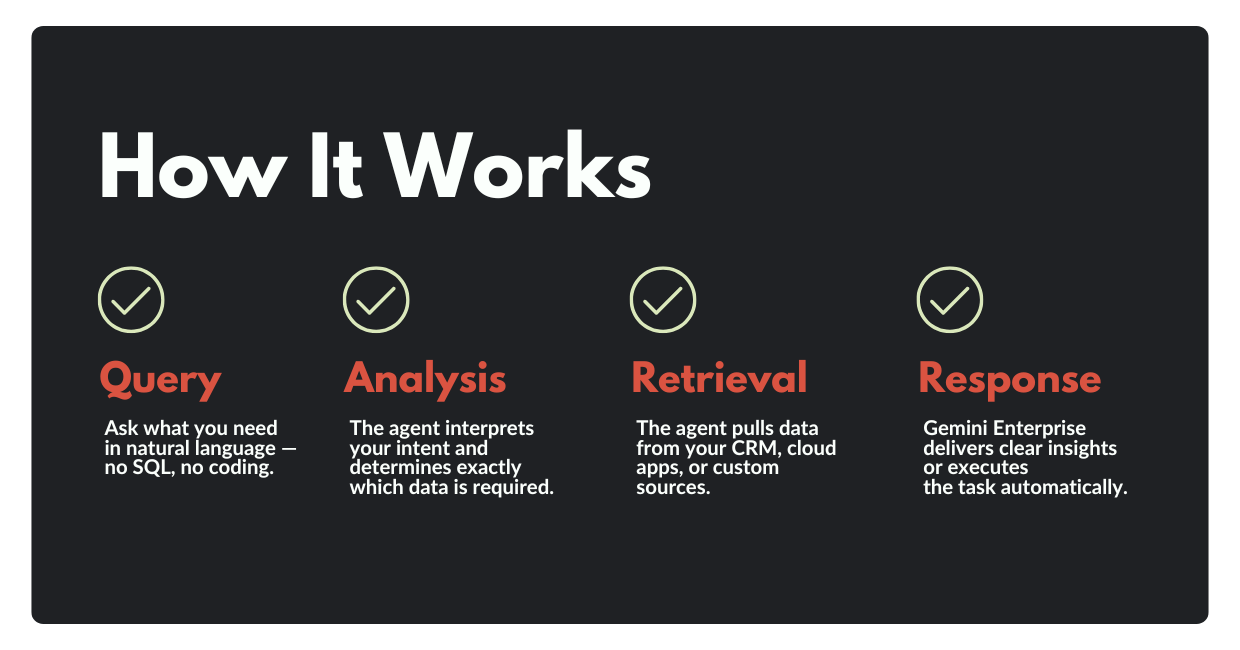
Executives buy enterprise AI expecting something close to an always-on expert: “Summarize last quarter’s pipeline risk, draft a customer email, and tell me what changed in the product roadmap.”
Then reality shows up.
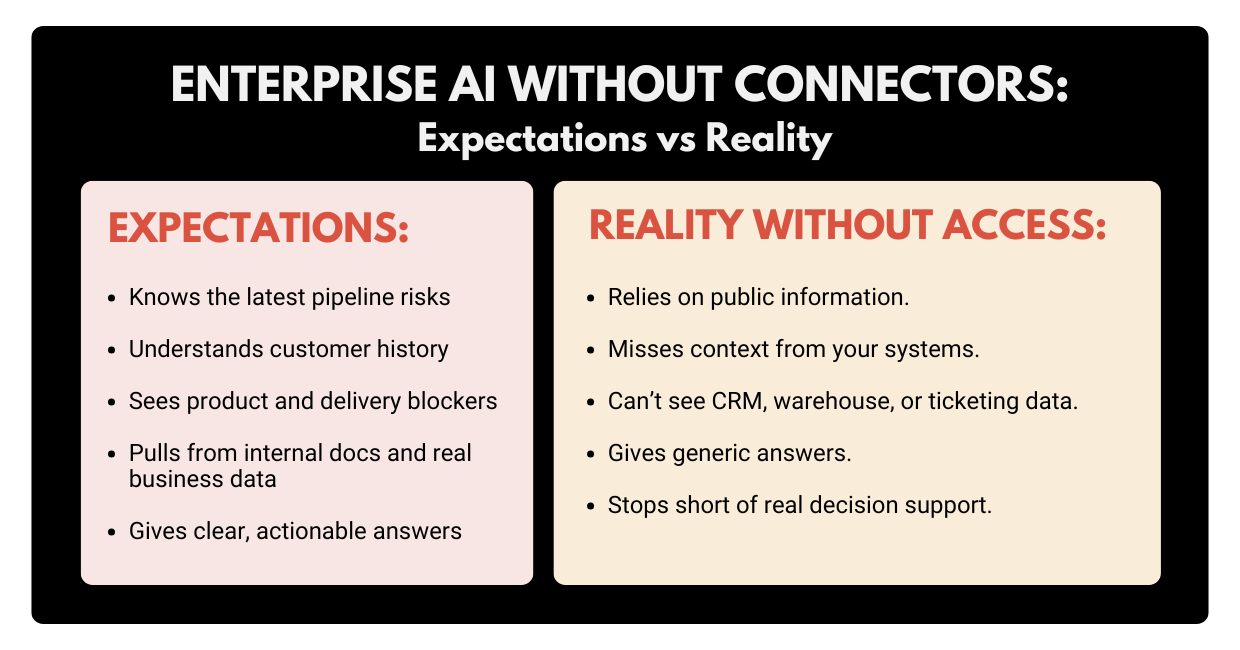
If your AI tool can only see the open web (and whatever you paste into a chat), it can sound confident while missing the most important facts: your facts. That’s the core of today’s enterprise AI problem: not the model IQ, but AI data access.
To see why, we need to talk about where your knowledge actually lives.
The Real Problem: Critical Knowledge Trapped In Silos
Every business says it wants a “single source of truth.” Most businesses run on twenty sources of truth that don’t talk to each other.
Your most valuable context is usually scattered across:
- CRMs (Salesforce, HubSpot): account notes, pipeline stages, renewal dates.
- Data warehouses (Snowflake, BigQuery): revenue, usage, churn, cohort performance.
- Work tracking (Jira, Asana): delivery risk, blockers, what’s really shipping
- IT & service platforms (ServiceNow): incidents, root causes, operational risk.
- Docs and knowledge bases (Confluence, SharePoint, Google Drive): process, decisions, “why we did it this way.”
- Chat and collaboration (Slack, Teams): decisions made in motion (and never written down).
The situation may get even more complicated: different teams store the same concept in different places. “Customer status” might mean one thing in the CRM, another in a BI dashboard, and a third in a support queue.
When data is split across tools, you get predictable failure modes:
- Answers are incomplete (because the AI only saw one system).
- Answers are outdated (because the AI saw a static doc, not the live data).
- Answers are ungrounded (because the AI fills gaps with “most likely” text).
- Workflows stop at advice (because the AI can’t take action in systems).
So when a leader asks AI a simple question like “What’s going on with Customer X?”, the real answer is a puzzle piece from five tools, and AI simply cannot give a single coherent answer.
People try to fix this with:
- Manual file uploads.
- Copy/paste into prompts.
- “Let’s export a report and share it with the AI” approach.
Yet, those hacks don’t scale, go stale fast, and create governance headaches.
So how do you give AI secure, governed access to business reality? You add a connector layer.
What Are AI Connectors and What They Are Not
Let’s get a bit more specific.
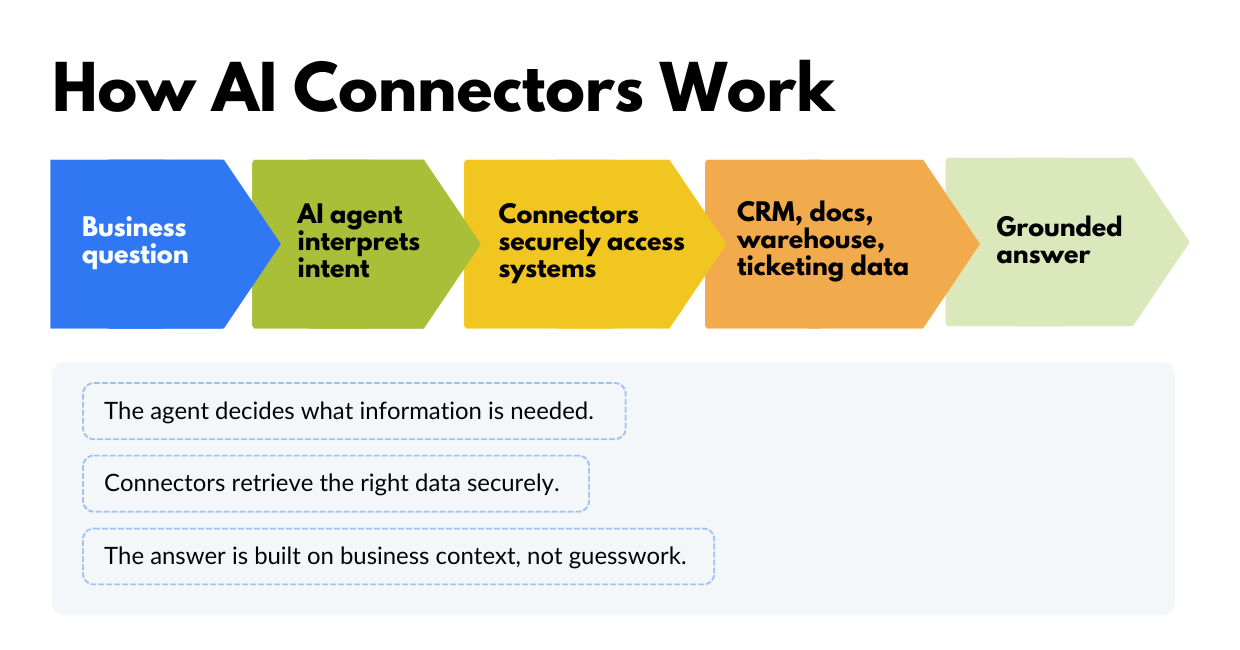
AI connectors are secure integrations that let an AI system access (and sometimes act on) data inside your business applications using the same permissions and rules your people have.
Here’s a more straightforward breakdown: an AI model is the “brain,” and your enterprise systems are the “memory” and “muscle.” Without connectors:
- the brain can reason,
- but it can’t remember what your company knows,
- and it can’t do anything inside your tools.
With connectors, you get AI data access that’s:
- repeatable (not copy/paste)
- permissions-aware (not “everyone sees everything”)
- fresh (syncs or queries the source)
- and useful (answers reflect your actual business state).
To keep expectations clean, it’s also essential to cover what connectors aren’t.
Connectors are not a one-time data dump.
If your business changes daily, your context needs to stay fresh.
Connectors are not fine-tuning.
Training a model on historical data doesn’t guarantee it knows today’s pipeline or today’s outages.
Connectors are not a magic shortcut around governance.
On the contrary, they make governance more important, not less.
Now let’s make this more practical: there are two common connector modes, and they map cleanly to how exec teams want AI to work.
Two Connector Modes: “Answer” Connectors vs. “Do” Connectors
A lot of connector talk gets fuzzy because people mix two different jobs.
Mode A: Connectors that help AI answer questions
These connectors pull in documents, records, and metadata so the AI can search and cite relevant internal information.
In Gemini Enterprise’s connector model, data is centralized into dedicated data stores, improving accessibility and search across enterprise content.
Typical use cases include:
- “Summarize what we promised this customer in the last QBR.”
- “Pull the latest product roadmap notes and list risks.”
- “Show me the decisions we made on pricing last quarter.”
Mode B: Connectors that let AI take action
This is where connectors become agents: the AI doesn’t just talk about work, but it can do work by calling tools and APIs.
Google’s Gemini ecosystem supports function calling to let models decide when to call defined functions to fetch data or take action through external systems.
Here are some typical use cases:
- “Create Jira tickets for these rollout tasks.”
- “Draft an email to this account team and schedule it for tomorrow.”
- “Update Salesforce notes after this call summary.”
In practice, many enterprises start with Mode A (to get answers right), then expand into Mode B (to automate workflows safely).
How Connectors Change Business Outcomes
When AI can reliably reference business context, it stops guessing. And that’s when leaders start seeing measurable impact.
Here are a few high-value patterns that show up fast once AI connectors are in place:
1) Up-to-date sales and account intelligence
AI can summarize account health by pulling from CRM activity, support tickets, product usage, and renewal timelines, without relying on someone’s memory.
2) Faster decisions in finance and operations
Instead of waiting on a dashboard owner, leaders can ask: “What changed in gross margin last month?”, and have AI trace the answer back to the underlying warehouse tables and definitions.
3) Better incident response and postmortems
Connected AI can correlate ServiceNow incidents, log summaries, Jira follow-ups, and the actual fix, and then draft a postmortem that reflects what happened.
4) Self-serve enablement for every team
New hires can ask questions in natural language and get answers grounded in your Confluence pages, internal docs, and approved policies, without pinging ten people on Slack.
5) Less “work about work”
Status updates, QBR prep, roadmap rollups, and stakeholder briefings get easier when AI can read the systems where work is tracked.
None of this requires an AI that is “more creative.” It requires an AI that can see the same reality your team works in.
That brings us to how Gemini Enterprise approaches this problem.
AI Gemini Enterprise Integrations: Where Agents Meet Your Data
Gemini Enterprise is positioned as an agentic platform: employees can use a chat interface, deploy ready-to-use agents from Google and partners, and create custom agents, while keeping enterprise security and governance in place.
5.1 Prebuilt connectors cover common enterprise systems
Gemini Enterprise includes prebuilt connectors for widely used tools, including Confluence, Jira, SharePoint, and ServiceNow.
Instead of asking people to “share more context,” you can make the AI context-aware by design, so answers don’t depend on who remembered to paste what.
5.2 Custom connectors cover the systems that actually make you money
Your real advantage rarely lives only in the standard list of SaaS apps. It lives in:
- homegrown tools
- proprietary databases
- internal knowledge bases
- unique workflows.
Gemini Enterprise provides guidance for creating custom connectors, including prerequisites and setup steps, reflecting that custom integrations are a first-class capability.
5.3 Agents and “connectors as tools” make AI useful beyond Q&A
When you combine connected data with agentic behaviors, AI becomes more than a chat interface.
Function calling is a key piece of that story: models can fetch up-to-date data or perform external operations by calling defined functions. Google’s own framing of Gemini Enterprise leans into this idea: an agent is only as good as its context, and Gemini Enterprise is built to securely connect to company data and govern agents centrally.
What ChatGPT and Claude Are Doing With Connectors
If you’re seeing “connectors” everywhere lately, it’s because every AI vendor ran into the same wall: enterprise value requires enterprise context.
ChatGPT: “connectors” became “apps”
OpenAI renamed connectors to apps inside ChatGPT, creating a unified experience for connected applications. Services like Google Drive, Dropbox, Box, SharePoint, and OneDrive are now integrated, so users can query their documents from within ChatGPT.
Claude: connectors + MCP integrations
Anthropic also made Claude integrations possible via a Connectors section in settings with admin controls for the Team/Enterprise tier. Additionally, Claude expanded these integrations through MCP to tools like Slack, Figma, Canva, and Asana, making the chat interface more “actionable,” not just informational.
What this means for businesses
The market has settled on a shared idea: AI’s usefulness rises sharply when it can securely connect to the tools where your business runs.
So your differentiator won’t be “we bought AI.” Your competitive edge will be how well you connect it, and how safely.
Which leads to the part most blogs skip: the production reality.
Security and Governance In the Real World
Enterprise leaders often want connectors for speed and then (rightfully) worry about risk.
A connector that works in a demo can still fail in production if it ignores basics like permissions, audit trails, or rate limits.
So let’s take a look at the non-negotiables for enterprise-grade Gemini Enterprise integrations and custom AI agents.
6.1 Permissions and identity: the AI must see what the user can see
If a salesperson can’t view a contract, the AI shouldn’t summarize it for them. Gemini Enterprise emphasizes permissions-aware access to enterprise information via connectors.
6.2 Freshness: stale data kills trust fast
Executives don’t forgive “mostly correct” numbers. A good connector strategy is explicit about:
- sync frequency
- incremental updates
- what happens on failures
- how fast new records become searchable
Gemini Enterprise’s connector model includes centralizing and storing data via connectors, so you can design for predictable retrieval, not ad-hoc copy/paste.
6.3 Governance: logging, auditing, and control are part of the product
Gemini Enterprise positions a central governance framework to visualize, secure, and audit agents.
That governance story matters because the moment AI touches customer data, you’ll get the questions (fairly): Who accessed what? When? Why?
6.4 Clear boundaries: retrieval vs decision vs action
A reliable agent doesn’t “freestyle” edits to systems. Instead, it does the following:
- Retrieves the right data
- Proposes an action
- Asks for confirmation (where needed)
- Executes through known functions/tools.
This maps neatly to function calling patterns supported in Google’s Gemini/Vertex AI ecosystem.
Now that we’ve defined what good looks like, the next practical step is deciding where to start, because nobody wants a six-month integration marathon before seeing value.
What to Connect First: A Practical Roadmap
The fastest way to get value is not “connect everything.” You need to begin by connecting the few systems that answer the questions your leaders ask every week.
Here’s a simple roadmap that works in most enterprises.
Step 1: Pick 3–5 executive questions you want AI to answer
Examples:
- “Which deals need attention this week?”
- “What’s the revenue impact if Feature Y slips?”
- “What are the top support drivers for our biggest customers?”
This keeps the project outcome-driven, not tool-driven.
Step 2: Map each question to the systems that hold the truth
Usually it’s some mix of:
- CRM (Salesforce/HubSpot)
- Ticketing/ITSM (Jira/ServiceNow)
- Knowledge base (Confluence/SharePoint/Drive)
- Warehouse (Snowflake/BigQuery).
Step 3: Connect the minimum set, then prove reliability
A common first wave looks like:
- Internal knowledge base connector (policies, product docs, enablement).
- CRM connector (pipeline, account context).
- Work tracking connector (delivery risk, roadmap truth).
- Warehouse connector (metrics with definitions, not screenshots).
Step 4: Add governance before you add more sources
Don’t bolt security on later. Build it in:
- Permission mapping.
- Logging and review flows.
- Clear “safe use” patterns for teams.
Step 5: Measure impact like a business initiative
Track outcomes such as:
- Time saved on weekly reporting.
- Faster answers to customer escalations.
- Fewer duplicate questions in internal channels.
- Improved consistency in exec updates.
Once priorities are clear, the next step is implementation. This is where most teams either ship something that sticks or get trapped in integration limbo.
Gemini Enterprise gives you the platform capabilities. The hard part is making them work with your exact data landscape, your access model, and your operational reality.
Zazmic helps you move from “AI pilot” to “AI that’s connected, governed, and usable,” by:
- Identifying the best first data sources to connect.
- Building production-ready AI connectors.
- Implementing permissioning, audits, and reliability patterns.
- Enabling custom AI agents that can retrieve and take action safely.
- Aligning outcomes to business KPIs.
Gemini Enterprise can already do impressive reasoning. The win is making that reasoning specific to your business. Contact Zazmic to assess which data sources you should connect first, and what order will deliver value fastest.
FAQ
What are AI connectors?
AI connectors are integrations that let an AI system securely access information inside business tools (CRMs, document stores, ticketing systems, warehouses) so answers can be grounded in the real company context.
Why are enterprise AI tools limited without connectors?
Without connectors, AI can’t see your pipeline, customer history, operational metrics, or internal decisions, so it answers in generalities.
Does Gemini Enterprise support connectors?
Yes, Gemini Enterprise documentation describes leveraging organizational data sources and includes prebuilt connectors for common third-party enterprise apps, with permissions-aware access.
What’s the difference between a connector and a custom AI agent?
A connector provides access to a system (authenticate, retrieve, respect permissions). A custom AI agent uses one or more connectors to complete a task (decide what to pull, how to reason, and what output/action to produce).
What systems should we connect to AI first?
Start with the systems that answer your most repeated leadership questions. For many companies: knowledge base (Confluence/SharePoint/Drive), CRM (Salesforce/HubSpot), Jira/ServiceNow, and a warehouse like Snowflake/BigQuery.
How long does a connector project take?
It depends on the systems, permission complexity, and whether you need read/write actions. A focused first wave (1–2 connectors and one agent workflow) is usually the fastest way to prove value and learn what to scale next.
