

Recent high-impact CVEs in cloud security and AI security all point to the same message: the real risk lives in misconfigured cloud infrastructure, weak identity and access management, and over-trusted AI assistants. If you run on SaaS, cloud, and AI, cybersecurity awareness is no longer a yearly training. It’s how you design, configure, and monitor every system you depend on.
Why 2025 Feels Different for Cybersecurity Awareness
If your company runs on SaaS, cloud infrastructure, and a couple of AI assistants on top, you’re already part of the security perimeter.
More than ever, cybersecurity awareness is not just “spot the phishing email.” It’s understanding how your cloud security, AI security, identity stack, and vendors actually behave when something goes wrong.
Recent data shows most leaders feel cyber risk has increased in the last year, with fraud and identity abuse leading the way. At the same time, the biggest incidents in 2025 share the same pattern:
- Misconfigured cloud infrastructure
- Weak identity and access management
- Over-reliance on third-party tools and plugins.
On top of that, AI is now wired directly into your documents, emails, code, and databases. When those systems are vulnerable, attackers don’t just get “some data”. They gain insight into context, history, and highly confidential information entrusted to your organization.
If you fail to protect that data, you risk losing clients and partners, incurring serious financial damage, and potentially jeopardizing the viability of your business.
That’s why cybersecurity awareness for leaders now means:
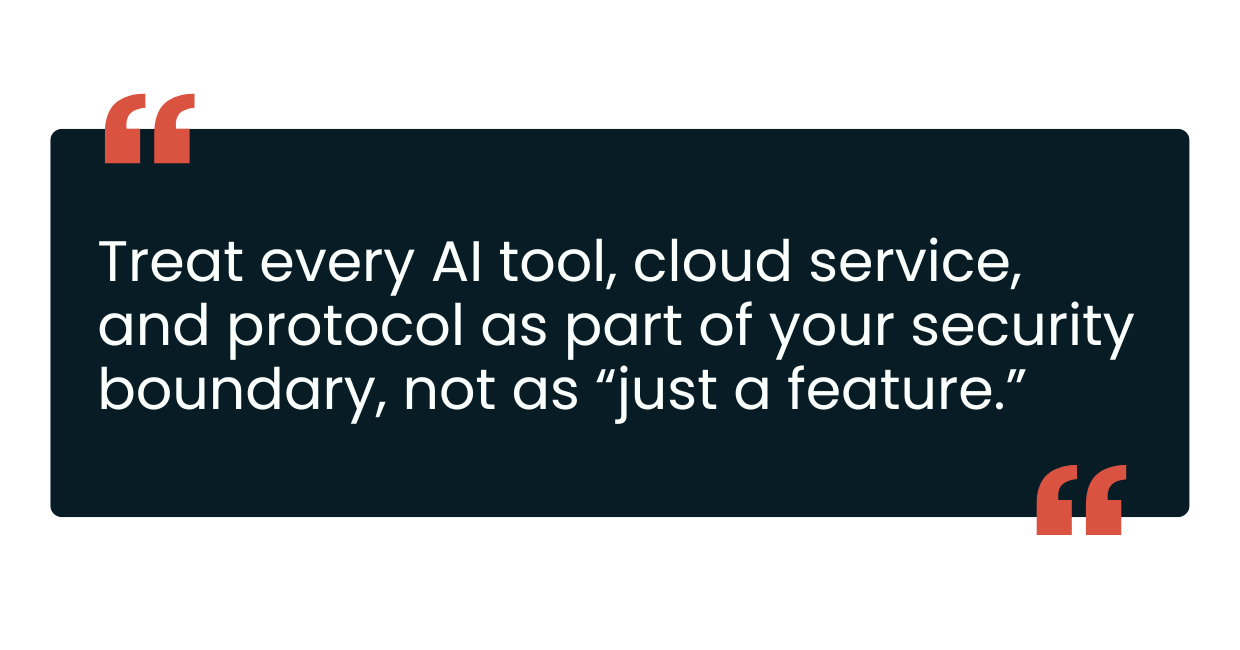
This mindset is exactly what you need when looking at the real-world CVEs that are shaping 2026.
5 CVEs Shaping Cybersecurity Awareness in 2025–2026
EchoLeak (CVE-2025-32711): Zero-click data theft in Microsoft 365 Copilot
Issue
A critical CVE in Microsoft 365 Copilot that allowed silent data theft through a single crafted email, no clicks or links involved.
What Happened
- An attacker sends an email with hidden instructions.
- Copilot’s retrieval indexes that email together with normal content.
- A user later asks a normal business question.
- Copilot pulls the malicious email into context.
- The hidden prompt instructs Copilot to exfiltrate data inside an image URL that the browser fetches automatically.
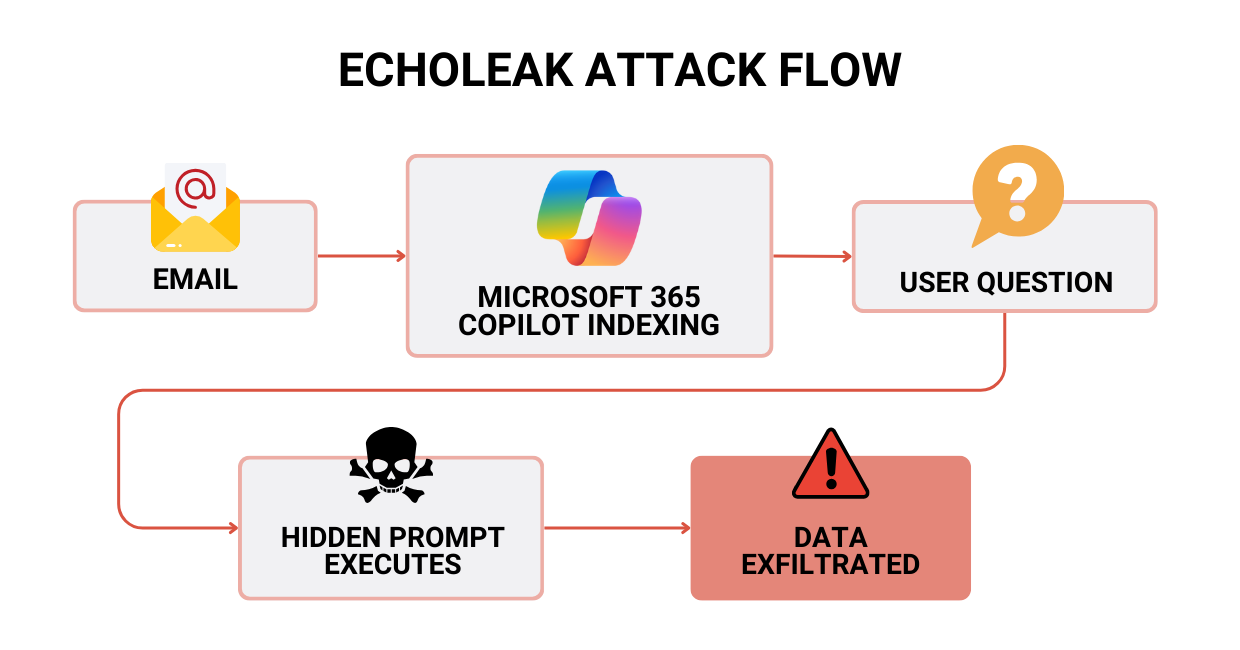
Microsoft patched it in June 2025 and flagged it as critical. Even with no confirmed exploitation, the message for cybersecurity awareness is clear: someone could “remote control” your AI assistants using only email.
Security Weaknesses
- Over-trusted external email content in an AI security context.
- No hard boundary between “outside” data and sensitive internal info.
- Output that allowed hidden URLs without strong filtering.
Impact If Exploited
No wonder this CVE was considered critical. If the attack worked, the hacker could:
- Pull confidential files and conversations from M365.
- Leak IP, financials, HR, or legal documents.
- Do all of this while users simply ask Copilot normal questions.
How This Should Change Your Cybersecurity Awareness
You can’t “fix Copilot,” but you can change how you govern it:
- Use strict data classification and DLP for AI assistants.
- Limit untrusted external content in AI retrieval.
- Monitor AI responses for strange external URLs or images.
- Define exactly which repositories Copilot can see, and for whom.
CVE-2025-54914: A Perfect-Score Azure Networking Flaw (CVSS 10.0)
Issue
A CVE in Microsoft Azure networking scored 10.0 (maximum). It allowed privilege escalation in the core cloud infrastructure without any user action.
What Happened
- The bug lived deep inside Azure’s own networking layer.
- An attacker who could reach the vulnerable component could escalate privileges without authentication.
- Your own firewalls or agents could not fully block it while unpatched.
Azure patched on their side. During the gap, customers had to rely on cloud security visibility and monitoring.
Security Weaknesses
- The bug lived deep inside Azure’s own networking layer.
- An attacker who could reach the vulnerable component could escalate privileges without authentication.
- Your own firewalls or agents could not fully block it while unpatched.
Azure patched on their side. During the gap, customers had to rely on cloud security visibility and monitoring.
Security Weaknesses
- A privilege escalation bug inside the provider’s control plane.
- Limited logging of networking and admin actions on the customer side.
Impact
- Admin-level control of cloud infrastructure networking resources.
- Pivot into other assets running in the same environment.
- Interruptions to production apps.
How This Should Change Your Cybersecurity Awareness
You can’t edit Azure’s code, but you can:
- Treat the control plane as the most precious asset.
- Enable detailed logs for networking and IAM changes.
- Apply least privilege; avoid blanket Owner/Contributor rights.
- Regularly review urgent provider advisories against your own setup
Redis “RediShell” (CVE-2025-49844): RCE in a Core Building Block
Issue
A remote code execution CVE in Redis, a critical datastore for SaaS, microservices, and AI workloads. According to the Common Vulnerability Scoring System (CVSS), this security event received a score of 10.0, the highest.
What Happened
- A 13-year-old bug in Lua scripting caused memory corruption.
- An authenticated user could escape the sandbox and run arbitrary code.
- Many Redis instances were exposed to the internet with no auth, turning “authenticated user” into “anyone who can reach the port.”
Patches landed on October 3, 2025. Redis Cloud customers were auto-patched, but on-prem and self-managed cloud users needed to act on their own.
Security Weaknesses
- Internet-exposed Redis with no authentication.
- No inventory or patching process for core components.
- Default to Lua scripting where it wasn’t needed.
Impact
If exploited, an attacker could:
- Run code on the underlying Redis host.
- Steal secrets cached in Redis (tokens, session IDs, configs).
- Move laterally into your Kubernetes cluster or VM network.
- Plant ransomware or backdoors at the infrastructure layer.
How This Should Change Your Cybersecurity Awareness
For most teams, the fixes are straightforward:
- Never expose Redis directly to the internet.
- Enforce auth and run Redis as a non-root user.
- Disable Lua if your app doesn’t require it.
- Add Redis to your regular patch and cloud security scanning cycle.
CVE-2025-6515: Prompt Hijacking in the MCP Ecosystem
Issue
A CVE in oatpp-mcp, a C++ implementation of Anthropic’s Model Context Protocol (MCP), allowed hijacking of AI sessions and prompts.
What Happened
- MCP connects AI assistants to tools, local files, and services.
- Session IDs were created by reusing raw memory addresses.
- Attackers could cycle through sessions, collect IDs, and wait for a real user to reuse one.
- Once reused, they could send malicious prompts and tool calls as if they came from the user.
Security Weaknesses
- Predictable session IDs.
- Weak validation of incoming events and prompts.
- Blind trust in anything sent over the “right” channel.
Impact
In practice, this opens the door to:
- Malicious code suggestions or commands pushed via AI assistants.
- Corrupted CI/CD flows and dev environments.
- Data tampering or exfiltration wherever MCP has access.
How This Should Change Your Cybersecurity Awareness
If you use MCP or build agentic AI:
- Treat MCP like security-critical middleware, not glue code.
- Use cryptographically strong, random session IDs.
- Validate event types and IDs strictly.
- Keep MCP servers behind auth, TLS, and network controls.
NVIDIA TensorRT-LLM (CVE-2025-23254): AI Framework Risk in Your Stack
Issue
A critical CVE in NVIDIA’s TensorRT-LLM framework: unsafe deserialization in the Python executor allowed local attackers to run arbitrary code and tamper with models or data.
What Happened
- TensorRT-LLM used Python pickle for inter-process communication.
- An attacker with local access (often via another flaw) could send crafted data.
- The framework deserialized and executed it with high privileges.
Security Weaknesses
- Unsafe serialization inside a high-privilege AI security framework.
- Assumption that “local traffic” is always safe.
- Weak validation of messages between AI components.
Impact
In AI production environments:
- Attackers can tamper with models (e.g., inject backdoors, change weights).
- Exfiltrate training data or inference data.
- Use the AI node as a launchpad for broader lateral movement in your cluster.
How This Should Change Your Cybersecurity Awareness
Here’s what can be done from an engineering and ops standpoint:
- Avoid unsafe serialization formats like pickle for inter-service messages.
- Apply standard AppSec practices to AI frameworks.
- Isolate AI runtimes with least privilege and runtime monitoring.
Together, these cases show that cybersecurity awareness in 2025 isn’t about a single tool or vendor. It’s about understanding how identity, defaults, and AI-heavy stacks behave under real pressure. That’s where common patterns start to emerge.
What All Recent Cybersecurity Cases Have in Common
Different vendors, different tech stacks, but the same cybersecurity awareness story. Let’s take a look at what all recent cybersecurity incidents share.
1. Identity and trust are the new perimeter.
- AI assistants trust emails.
- Cloud infrastructure trusts its own control plane.
- Protocols and datastores trust anything that reaches the “right” port.
This is why strong identity and access management and clear trust boundaries matter more than ever.
2. Misconfiguration and defaults are doing a lot of damage.
- Redis exposed with no auth.
- AI tools with broad “full environment” access.
- Critical cloud security logging disabled or kept at minimal levels.
Attackers love defaults. Your cybersecurity awareness program should assume defaults are unsafe until proven otherwise.
3. The attack surface now includes protocols, plugins, and agents.
- Prompt injection and prompt hijacking.
- Misuse of MCP and similar protocols.
- Vulnerable frameworks inside AI security stacks.
You can’t ignore the glue code anymore.
4. Small teams are as exposed as large enterprises.
Azure, Redis, MCP, NVIDIA, and SaaS copilots are used by startups, SMBs, and global enterprises alike. Cybersecurity awareness has to scale down as well as up.
Taken together, these lessons point to a single priority: get clear on what you run, how it’s configured, and how your AI and cloud tools expand your attack surface. That’s where a practical checklist becomes useful.
Zazmic’s Cloud and AI Cybersecurity Checklist for Businesses
Cybersecurity incidents are evolving faster than most teams can track. The CVEs above are only a slice of what’s out there, but they all point to the same question: how prepared is your organization today?
Our team of experts built this cloud and AI cybersecurity checklist as a practical starting point. Use it to see where you’re solid, where you’re exposed, and what to prioritize next.
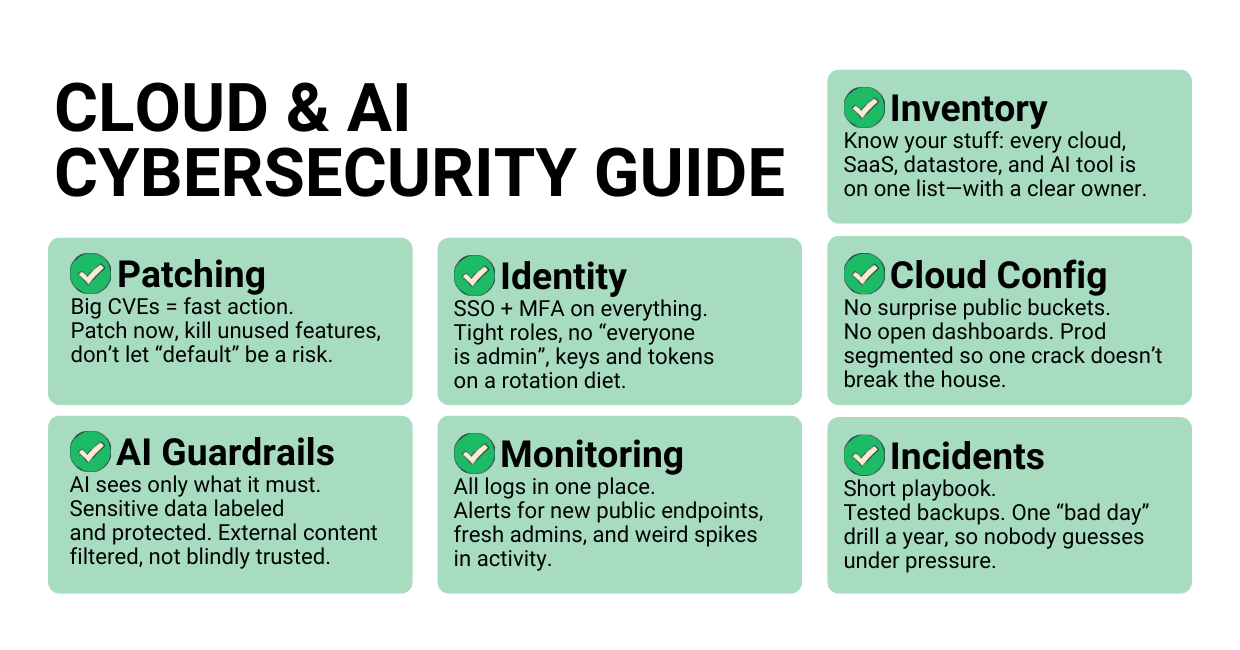
1. Know what you actually run
Create and maintain a live inventory of:
- Cloud infrastructure accounts, regions, and projects.
- Internet-facing services (load balancers, APIs, admin panels).
- Datastores like Redis, databases, object storage.
- AI assistants, MCP servers, TensorRT-LLM, vector DBs
For each asset, define a business owner and a technical owner.
2. Patch and harden the basics
- Subscribe to advisories from your cloud security and AI vendors.
- Set a regular patch rhythm, plus a fast track for 9.0+ CVEs.
- Turn off features you don’t use (Lua scripting, unused plugins, debug endpoints).
3. Treat identity as critical infrastructure
- Enforce SSO and MFA across cloud and SaaS.
- Apply least privilege in identity and access management.
- Review service accounts, API keys, and tokens: where they live, what they can do, and when they were last rotated.
4. Secure your cloud infrastructure configuration
Run continuous posture checks to catch:
- Public buckets and open databases.
- Exposed admin consoles (Redis, Kubernetes dashboards, etc.).
- Over-permissive network rules.
Segment networks so one compromised environment doesn’t take everything down.
5. Put guardrails around AI assistants and agents
Define which data AI tools may access:
- Only the drives, repos, and mailboxes they truly need.
- Use sensitivity labels and DLP for finance, HR, legal, and IP.
Constrain external content:
- Don’t blindly let emails, websites, or untrusted files feed your AI context.
- Use allow-lists or sanitization where possible.
For MCP/tools/plugins:
- Require auth and TLS on MCP servers and AI tools.
- Avoid predictable session IDs; use secure random IDs.
- Log and alert on unusual tool usage (e.g., mass file reads, package suggestions from unfamiliar registries).
6. Monitor like you expect to be attacked
Enable and centralize logs for:
- Cloud control plane (config changes, networking, IAM)
- Datastores (Redis, DB access, failed auth)
- AI systems (tool calls, high-risk prompts, data exports)
Set up basic alerts:
- New public endpoints
- New admin users or role changes
- Spikes in failed logins or API calls
7. Prepare for “bad day” scenarios
- Keep a short, written incident playbook: who leads, who talks to customers, how to isolate systems.
- Test backups and restores against your RTO/RPO.
- Run at least one tabletop exercise a year on:
- Cloud misconfiguration and data leaks
- AI security failures (compromised AI assistants)
- Ransomware in your cloud infrastructure.
Go From Cybersecurity Awareness to Action
You don’t need a 200-page security strategy to avoid most of the pain we just walked through. You need:
- Visibility into what you run
- The discipline to patch and harden critical pieces
- Clear guardrails around your cloud and AI tools
- A simple plan for when something goes wrong
At Zazmic, we help teams do exactly that on Google Cloud and modern AI stacks: from assessing current risk, to tightening cloud posture, to putting real-world guardrails around copilots and agents.
Join our cybersecurity webinar to learn how to:
- Secure your stack end-to-end (cloud, SaaS, AI assistants, and agents).
- Use Google Cloud security tools (SCC, IAM, VPC, Cloud Armor, Chronicle) to detect and stop threats.
- Lock down identity and access so attackers can’t pivot through weak accounts.
- Reduce real risk fast with a simple, focused action plan.
- Get a FREE Zazmic cybersecurity assessment with clear, next-step recommendations
Reserve your spot and get a sharp, business-first view of where your defenses stand and what to fix first.
FAQ
1. What does “cybersecurity awareness” mean in 2025?
Cybersecurity awareness is the practical understanding of how your people, processes, cloud infrastructure, and AI assistants can be attacked and what each person must do to reduce that risk every day.
2. Are small teams and businesses also a target?
Yes. The same Redis, MCP, copilots, and cloud services that power enterprises also power startups and SMBs. Threat actors don’t always care about your logo size; they care about accessible data and weak configurations. Studies show that smaller organizations struggle to keep up with cyber risk as much as larger ones.
3. How often should we review our cloud and AI security posture?
At a minimum, run a formal review quarterly, with continuous monitoring for misconfigurations and critical CVEs. For high-impact services like identity, networking, AI runtimes, and Redis, treat critical advisories as “same-week” work, not “next-quarter” work.
4. Is cybersecurity awareness teh same as employee phishing training?
Phishing training is still important, but on its own, it’s outdated. Modern cybersecurity awareness should cover:
- How AI assistants can be abused.
- Why cloud misconfigurations and weak IAM are so dangerous.
- How third-party services extend your attack surface.
5. How can small teams improve cybersecurity awareness without hiring a big security department?Start with a simple, repeatable checklist that guides your day-to-day security work and makes responsibilities clear.
Focus on:
- Inventory
- Patching
- Identity
- Basic monitoring
Then bring in partners to help with deeper cloud security and AI security work where needed.
