

Google Veo 3 is Google’s latest AI video generation model, turning text or images into Google Veo 3 is Google’s latest AI video generation model, designed to turn text and images into cinematic videos with native sound and professional camera motion. Integrated across Gemini, Flow, and Google Workspace, it helps businesses cut video production costs by up to 90% and create polished content in just minutes. From marketing and training to internal communications, Veo 3 makes high-quality, scalable video creation accessible to every team.
Video today is the default language of the internet, but producing it is still slow, expensive, and messy for most businesses. Editing timelines, syncing sound, managing gear all sum up into one bottleneck that keeps even great teams from creating videos.
And that’s exactly why Google Veo 3 means so much in the current media-dependent economy. This generative video model lets you describe a scene and instantly watch it come to life in cinematic quality, complete with synchronized audio and dynamic camera movement.
If you’ve ever wished you could turn a storyboard, pitch, or idea into a full video in minutes, Veo 3 makes that a reality because what used to take a full production team can now be done in one browser tab.
What Is Google Veo 3 AI?
Veo 3 is Google’s latest AI video generation model, designed for creators, marketers, and businesses that want studio-level production without the studio overhead. It turns text or images into realistic motion video, including lighting, sound, and emotional tone, powered by the same AI foundation that drives Gemini Enterprise.
Built on advances in diffusion models, temporal coherence, and audio synthesis, Veo 3 understands not only how things look, but how they move, sound, and interact. This innovative approach ensures the outputs feel believable and cinematic instead of synthetic. In short, you describe the idea, Veo 3 directs it for you.
Why Veo 3 Matters for Businesses
Most organizations already know video works: it boosts customer engagement, conversion, and retention. What stops them is the production complexity: you need a budget, time, and the right skills to make a truly impactful video.
Veo 3 addresses all three. It gives marketing teams, educators, and product owners the ability to create professional, high-quality, and on-brand videos in just minutes.
Here’s what that means in numbers:
- Up to 90 % lower production costs
- 2–3 minutes average render time per clip
- Native integration with Gemini, Flow, and Google Workspace
- Scalable access via Pro ($19.99/mo) and Ultra ($249.99/mo) plans
Now, even small teams can build high-impact visual content pipelines without hiring creators, editors, or agencies.
Core Features of Veo 3 AI that Businesses Love
Veo 3 was built to remove the creative barriers that slow businesses down. Its core features let users with varying levels of tech proficiency create cinematic videos using nothing but a prompt.
Here are the key Veo 3 features that change the game:
Text-to-Video Generation
Transform plain text into an HD, emotionally rich video.
Ideal for marketing campaigns, explainers, or training content.
Image-to-Video AI Animation
Upload stills, for example, product photos or brand visuals, and Veo 3 will bring them to life.
Perfect for e-commerce and creative storytelling.
Native Audio with Lip-Sync
Generates dialogue, ambient sound, and background music automatically.
No more manual sound editing or stock-music searching.
Advanced Camera Controls
Add cinematic movement, dolly, zoom, aerial, or rack focus, just by writing it in your prompt.
With Veo 3, anyone can direct like a pro.
Platform Integration
Use Veo 3 directly in Gemini, Flow, Google Vids, Canva, or Pixelcut.
This feature simplifies collaboration and cross-tool workflows.
In essence, Veo 3 gives teams creative freedom and operational speed to experiment and deliver your brand story to customers faster.
How Google Veo 3 Works (in Plain English)
You don’t have to be a filmmaker or AI engineer to use Veo 3. All you need for Veo 3 to work is an idea and natural language to describe it – the model will figure out the rest.
The process of AI-powered video creation is beautifully simple:
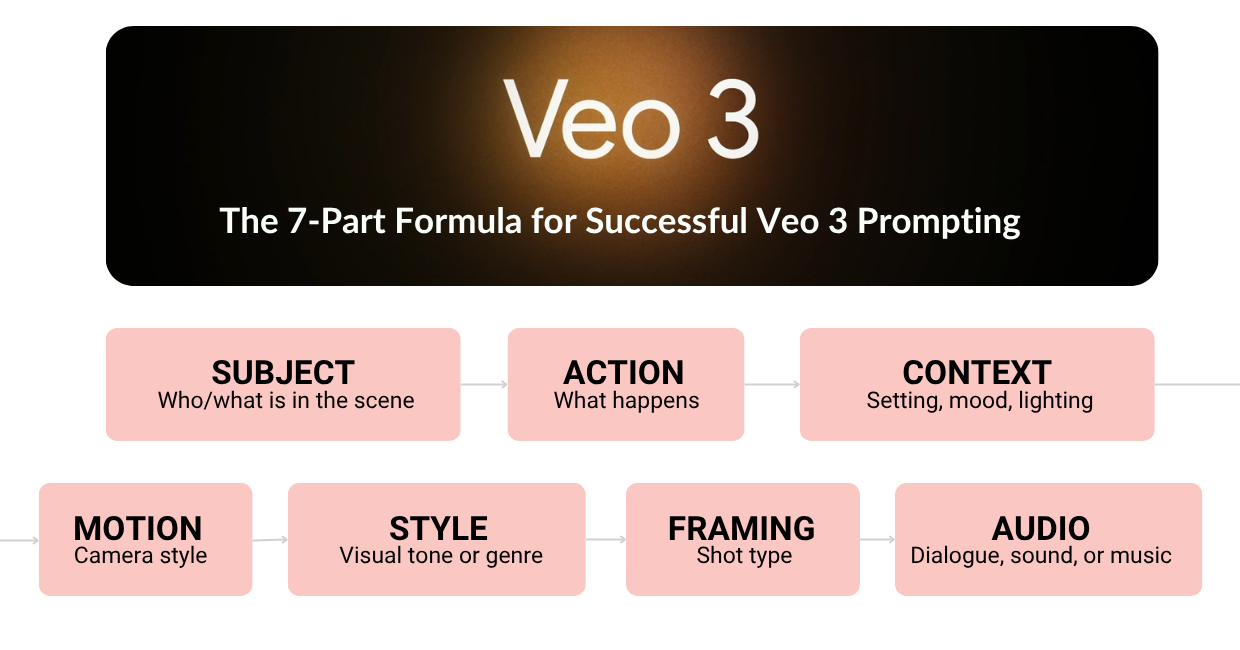
- Write a structured prompt: describe subject, action, context, motion, style, framing, and audio.
- Submit it in Gemini or Flow.
- Veo 3 interprets your intent, lighting, and mood.
- Within minutes, you get a cinematic clip with synchronized audio
Let’s take a look at the example. You can write the following prompt: “A team celebrating a product launch in a modern office, handheld camera, upbeat music, confetti animation.”
You get a realistic, brand-ready video minus the need to go looking for a colleague willing to be featured in the video.
Real-World Use Cases for Veo 3 in Business
From marketing and education to HR and internal communications, Veo 3 AI helps teams replace expensive production cycles with instant, reusable content generation.
Here’s where it fits best:
Marketing & Brand Awareness
- Product demos and feature explainers that feel like live shoots.
- Brand story videos with founder narration and emotional flow.
- Ad creatives for campaigns across YouTube, Instagram, and LinkedIn.
Training & Enablement
- Onboarding walkthroughs for new hires.
- Compliance and SOP explainer videos.
- Interactive knowledge clips replacing long manuals.
Customer Engagement
- Personalized thank-you or follow-up videos generated from templates.
- FAQ-based support clips built from chat transcripts
- Announcement videos for updates or product launches
Internal Communication
- Leadership messages and quarterly updates.
- Department recaps or culture spotlights.
- Internal education content for hybrid teams.
No matter the industry or team size, Veo 3 bridges the gap between ideas and storytelling. With Google’s AI-powered video generation, every department is empowered to create unique content without depending on the creative team.
Stunning Videos in One Click: Prompting Tips for Veo 3 AI
Getting cinematic results with Veo 3 is all about clarity. The model is powerful, but like any creative partner, it performs best when given detailed instructions.
Pro tip: include quoted dialogue (“She says, ‘Welcome aboard!’ ”) to generate realistic speech and lip-sync.
If you want to elevate your AI content creation, make sure to include the following information in the prompt:
- Subject: Who or what is in the scene.
- Action: What they’re doing.
- Context: Setting, lighting, time of day.
- Motion: Camera movement or transitions.
- Style: Tone, genre, or aesthetic.
- Framing: Wide shot, close-up, angle.
- Audio: Dialogue, background sound, or music mood.
The clearer your prompt, the more cinematic the result. Let’s explore what Veo 3 can create when the prompt is correctly written.
Example 1
Prompt:
“A young female barista in a cozy café … preparing a latte and handing it to a smiling customer. Warm interior lighting, mid-morning setting, light chatter in the background. Slow dolly shot from behind the counter to a close-up of the coffee. Soft lighting, natural tones, documentary-style. Starts with a wide shot, then cuts to a tight close-up. Barista says, ‘One latte coming right up.’ Light jazz music plays in the background.”
Result:
Example 2
Prompt:
“Professional product demonstration of a speaker, rotating 360 degrees on a white background with soft studio lighting, modern aesthetic.”
Result:
Example 3
Prompt:
“Golden hour cinematography, wide-angle shot of snow-capped mountain peaks with dramatic clouds, warm orange and purple sky, professional nature documentary style, 4K quality.”
Result:
Treat Veo 3 prompts like scripts: the more detail you provide, the more natural and engaging the result will be. With a few tries, you’ll start to notice how small wording changes help AI create the right mood and pacing for your videos.
Veo 3 Efficiency & Cost Optimization Checklist
Even with AI automation, strategy still matters. Use these best practices to keep your Veo 3 workflow efficient, cost-effective, and scalable.
- Batch prompts during focused sessions to reuse structures.
- Save high-performing prompts as templates for repeat use.
- Keep videos short (8-12 seconds perform best on social).
- Track credit usage to control monthly budgets.
Following this checklist helps teams scale responsibly and turn creative testing into a repeatable, data-driven process that balances quality with cost.
Integrating Veo 3 with Gemini Enterprise
Veo 3 isn’t a standalone product. It’s part of the growing Google AI ecosystem. Here’s how teams can access and integrate it across the tools they already use daily.
- Gemini Pro & Ultra – generate short videos directly from chat prompts.
- Google Flow – build multi-scene narratives with continuity and storyboards.
- Google Vids (Workspace) – create explainer or training videos from existing Docs and Slides.
With these integrations, Veo 3 fits into almost any business workflow, from campaign ideation to publication.
For companies already using the Google Cloud AI platform, Veo 3 connects directly with Gemini Enterprise and Vertex AI.
This means:
- Centralized data governance and access control.
- Scalable rendering for enterprise content teams.
- Secure AI workflows that meet compliance standards.
Together, Gemini Enterprise + Veo 3 give your teams an end-to-end pipeline for generating, editing, and distributing video content securely at scale.
The Future of Business is in Motion
Video is the new business language. And for the first time, creativity isn’t limited by budget, tools, or technical skill. With Veo 3, your words become direction, your imagination becomes motion, and your message becomes a movie.
Curious how Veo 3 and Google Gemini Enterprise can power your next campaign or automate your content workflow? Book a free consultation with our AI experts to explore what’s possible for your business.
FAQ
1. Is Veo 3 free to use?
Not right now. Veo 3 is available through Gemini Pro ($19.99/mo) and Gemini Ultra ($249.99/mo) plans, each including monthly video credits.
2. How is Veo 3 different from other AI video tools?
It generates both video and matching audio, maintains scene coherence, and connects directly with Google’s AI ecosystem for enterprise scalability.
3. Can I use Veo 3 for corporate training?
Absolutely. Many teams already use Veo 3 for onboarding, safety, and compliance videos.
4. Does Veo 3 support mobile use?
Yes. Tools like Pixelcut and Canva integrate Veo 3, allowing mobile creation and quick social publishing.
5. How secure is enterprise video generation with Veo 3?
Within Gemini Enterprise, all processing occurs inside Google Cloud’s secure environment, so your assets stay private and compliant.
